
WPLP Compliance Platform Review: A Comprehensive Privacy Solution for Your WordPress Website
In 2025, WordPress is still at the top as it powers more than 43% of all websites that live on the Internet. But more than 70% of them are not compliant, risking the privacy of their users and the risk of being fined massively. Hence, a tool like WPLP Compliance Platform is an ideal solution for such cases.
WPLP Compliance generates legal pages and sets up cookie consents within the regulation requirements in the matter of minutes.
But how easy is it to use? What is its pricing? And is it good for every business scale, from small to enterprise level?
In this review, we will cover everything you need to know about this WordPress privacy plugin and how to use it properly so that you can get the most out of it.
Overview of the WPLP Compliance Platform: Key Features, Pros, Cons, and Pricing
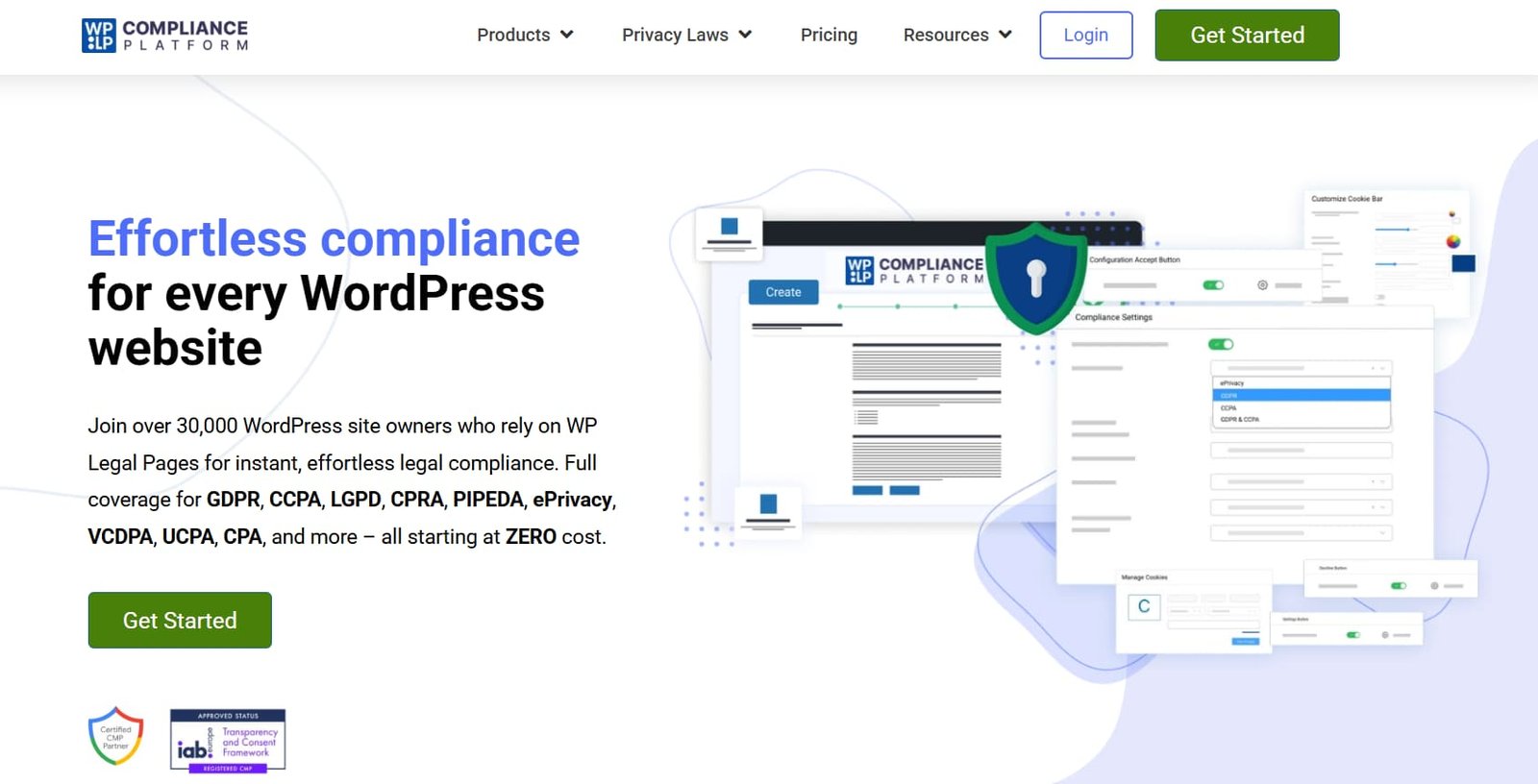
WPLP Compliance Platform is a plugin suite that includes two plugins: WP Legal Pages and WP Cookie Consent.
- WP Legal Pages lets you generate and manage the legal pages required for your website.
- WP Cookie Consent allows you to implement Cookie consent banners when users visit your plugin.
With the help of these two solutions, you can properly generate and manage your key policies and compliance to all the data laws and rules required globally.
For site owners, non-compliance is not just a technical issue but can lead to hefty fines, reputational and numerous legal headaches. That’s why using a robust compliance plugin like WPLP Compliance Platform provides you with a straightforward solution.
Key Features of this plugin
- Easy legal pages generation with over 30 pre-built templates with easier customization of details
- Prevents any third-party scripts or cookies from launching before the user consent.
- Geo target consent banners allowing users to see geography based banners like GDPR-style for EU visitors and CCPA notices for US visitors
- Supports compliance for various major laws/regulations globally.
- Compatible with various page builders like Elementors and necessary plugins like WooCommerce.
- Supports IAB TCF 2.2, which is especially useful for websites running ads or programmatic advertising.
- Includes support for Google Consent Mode v2, which helps you to adjust your analytics or ads behavior on user consent.
Pros and Cons of the WPLP Compliance Plugin
| Pros | Cons |
| Easier setup and integration for both of the plugins. | The Free version has limited functionality which may not be enough for all the compliance needs |
| Affordable Price and Free tier option | Templates are generic, meaning it may not cover up for complicated industries such as healthcare and finance. |
| Compatibility with popular WordPress products like Elementor, Gutenberg, and WooCommerce | Settings are a bit overwhelming for beginners, especially if they do not understand legal terms. |
| Effective script and cookie control helps your website to remain compliant to all the necessary regulations. | |
| Region specific compliance allows your website to be compliant for every region, wherever your target audience may be. |
Pricing of WPLP Compliance Platform
WPLP comes with the freemium model, meaning that you can use the free version of the plugin with limitations within the features.
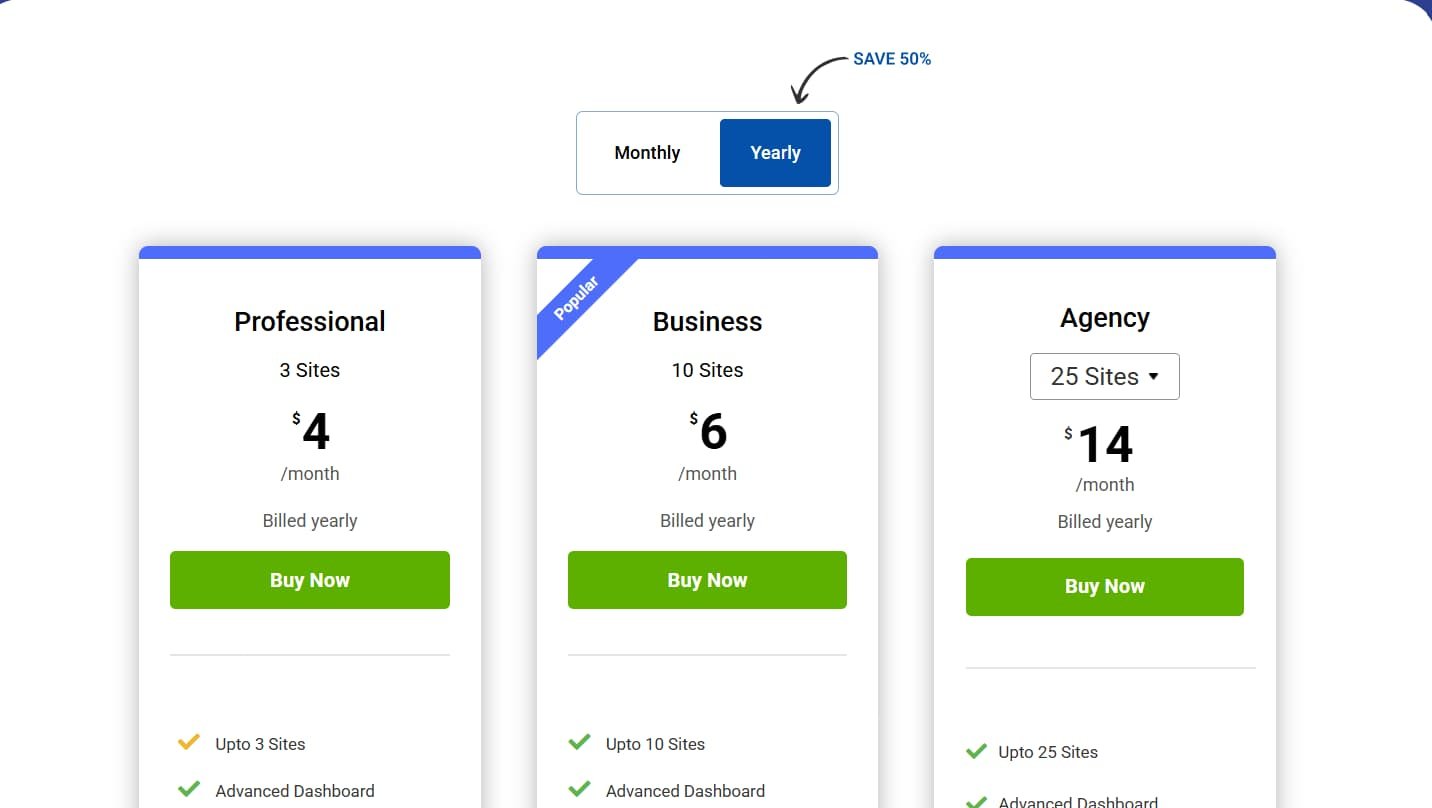
The pricing for the premium ranges based on different plans. There are three plans, Professional, Business and Agency.
Now at the time of writing this review:
- Professional plan starts with $4 per month for yearly plan limiting to 3 sites only. Besides automatic policy updates and limitations to scans and page views, all the features are pretty much the same as the higher tier plans.
- With $6 per month in yearly plan, you can get the Business plan that can be used for 10 different sites. All the features are pretty much unlocked including Auto-Updates policies which can help you to stay compliant for every change in regulations along the global.
- Agency plan allows you to use the plugin for only $14 per month on a yearly plan. All the features remain the same as Business but the limitation increases from 10 to 25 sites.
Every premium plan will offer you the same type of features, with the slight difference in limitations. For your information, I have chosen the Business plan for this review.
Go through their pricing page to purchase your preferred plan.
Setup and Installation
The setup and installation of WPLP Compliance Platform is pretty easy. Here’s what I did and what you have to do to perfectly set up the plugins in your website.
- Go to wplegalpages.com to log in or sign up to a new account.
- After completing the account setup, you’ll be redirected to your dashboard. Here you can download the WP Legal Pages and WP Cookie Consent plugins.
- You can also download them directly from your WordPress admin dashboard.
Learn how to install plugins on your WordPress dashboard easily.
- After downloading and installing the plugins, you’ll be redirected to the dashboard of the WPLP plugin suite where you’ll be set to use this privacy plugin.
Creating Legal Pages with WPLP Compliance Platform
After the successful setup of the suite, you can then try the core feature for the WP Legal Pages plugin, to create or generate legal pages (from the dashboard, WP Legal Pages → Create Legal Pages).
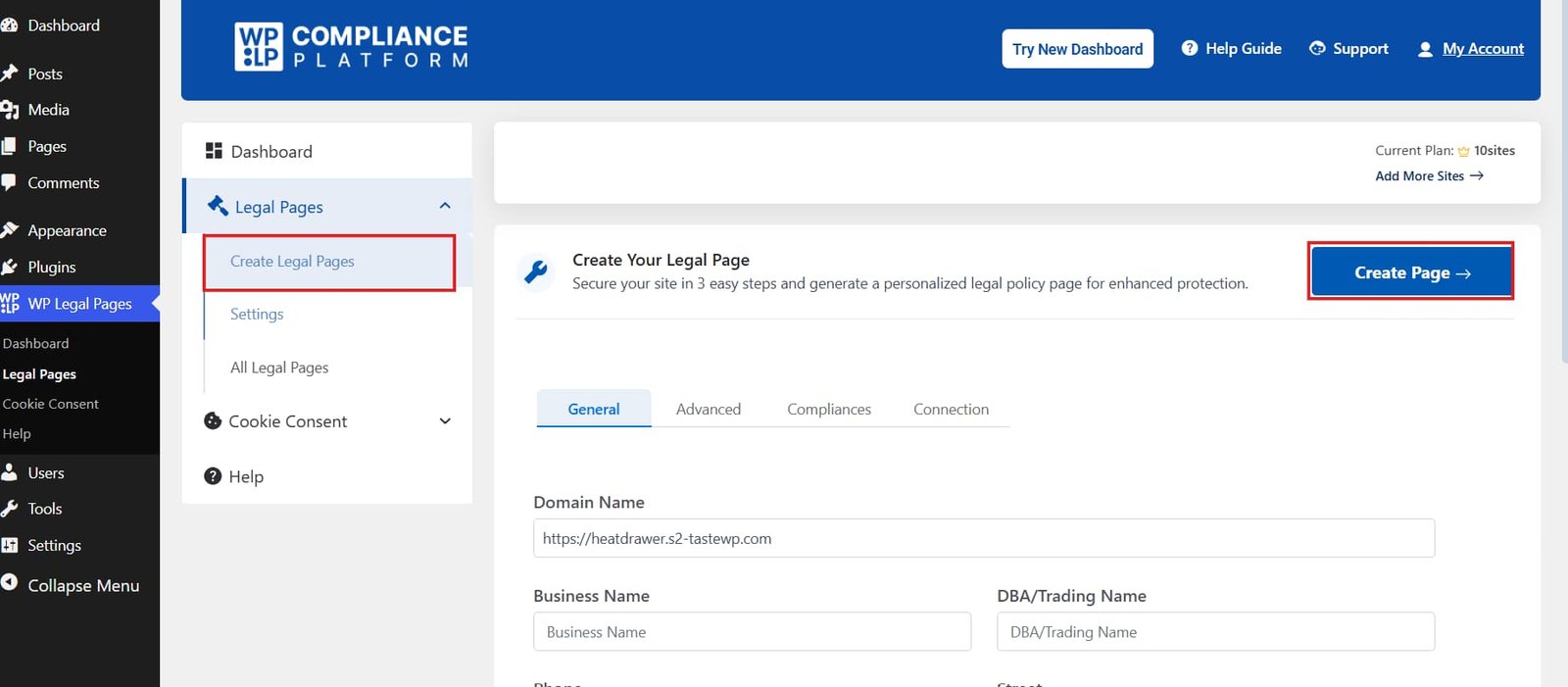
After clicking the button, a Setup Wizard prompts in, which then will guide you to create a legal page for your website.
Here’s what you will see:
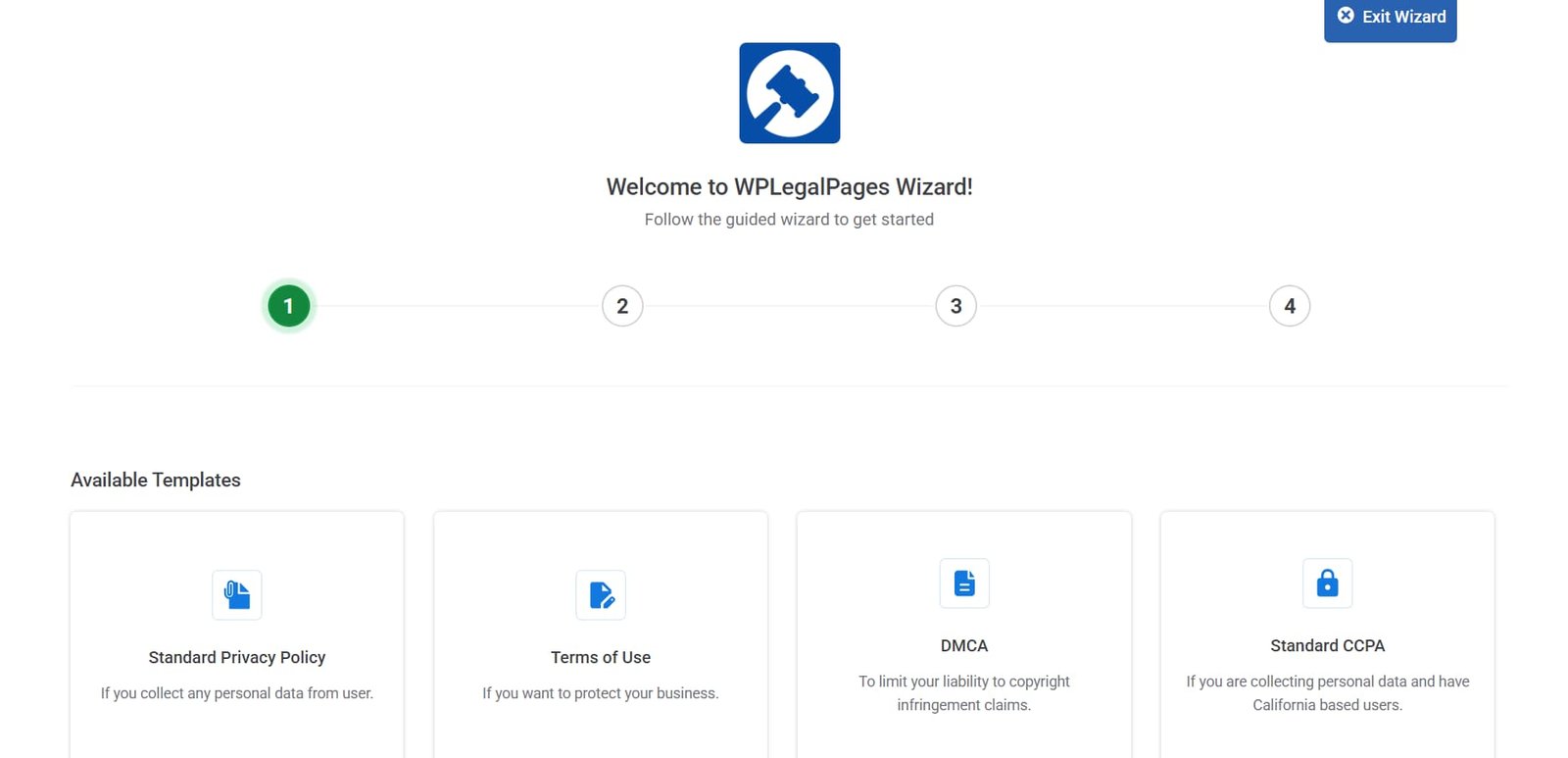
- The first step is to select the type of legal page that you want to generate. The Lite version or the free version of the plugin enables you to select 4 different, which honestly will not be enough for you if you have complex business or higher global reach of traffic
- I selected the Terms of Use template for the purpose of this review, which guided me to the next step.
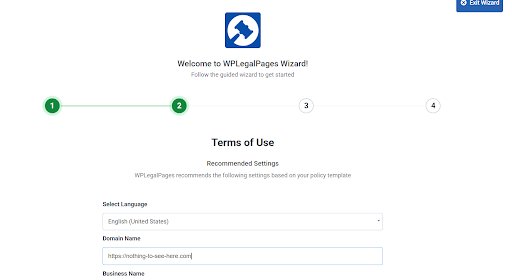
- In the second step, I was asked to fill in some details, regarding my business including Domain Name, Business Name and Trading Name.
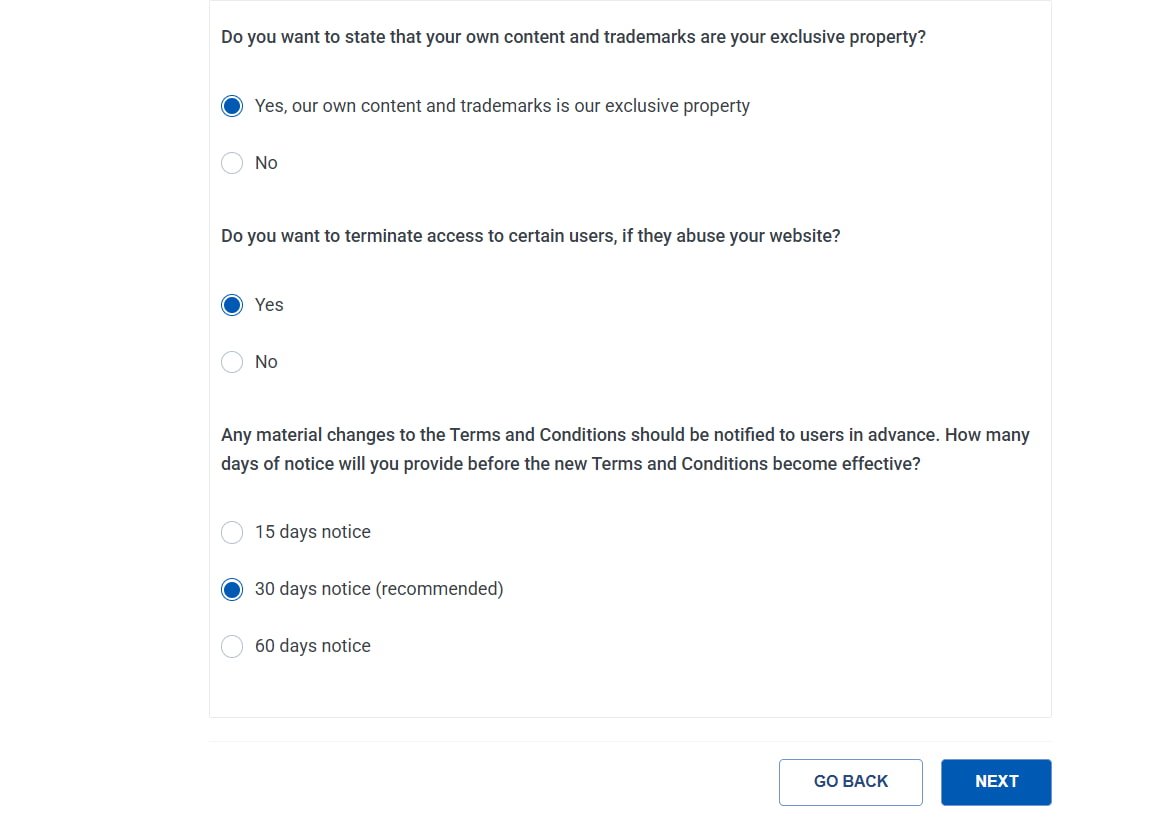
After filling up the details, you will find the Data Sections where you have to declare some points in the given section including Notice Period time if you decide to change your site’s Terms and Conditions.
- After filling up the necessary details, you’ll be shown the preview of the page
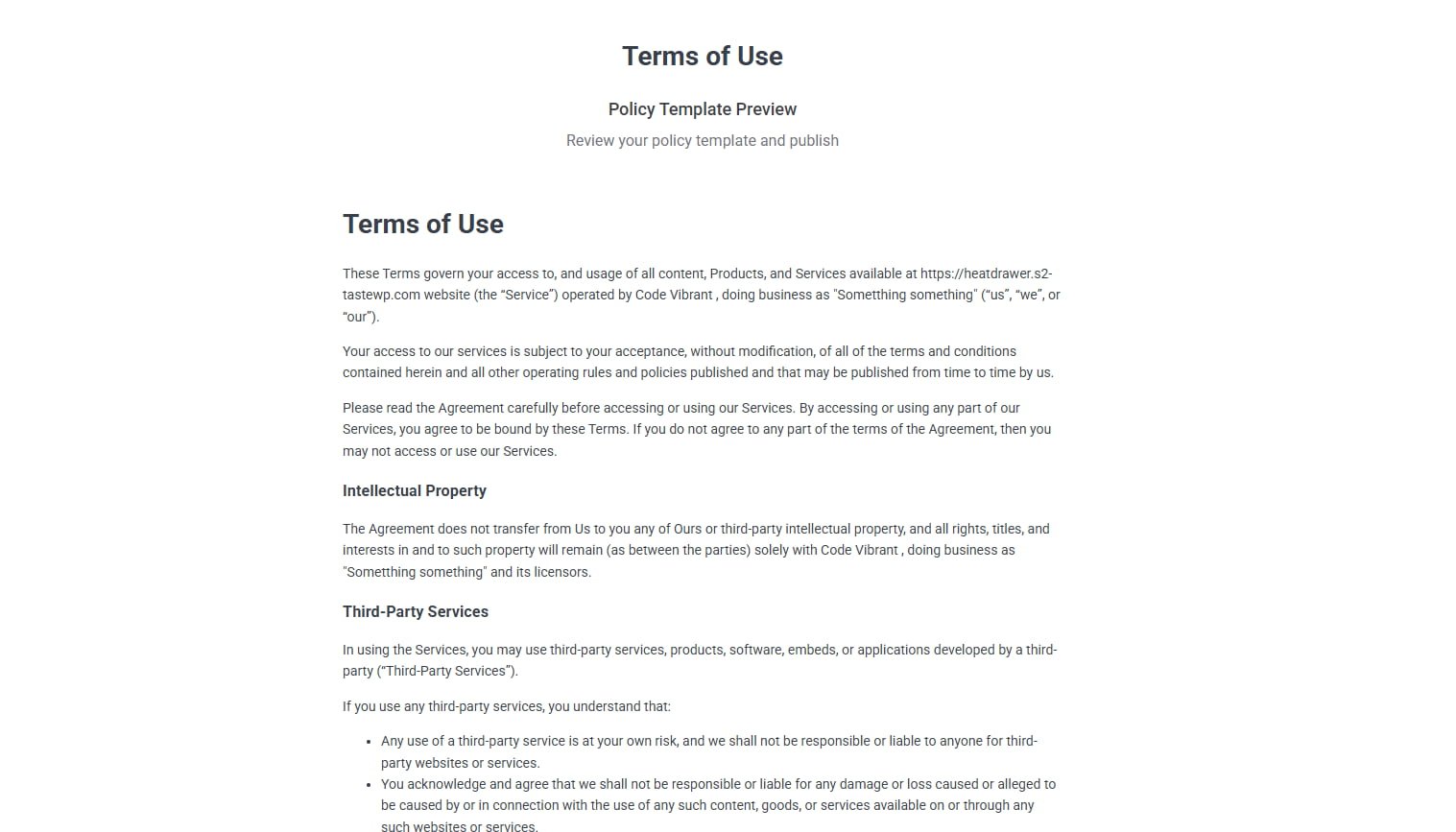
- Then you’ll be able to edit the template if you wish to, by clicking on the Create and Edit button. And you can publish it, after changing your preferences.
You can choose any provided templates to quickly create your legal pages with the same steps with the WP Legal Pages plugin.
You can also go further to change your settings for the legal pages..
Just head to Settings from the WPLP Compliance plugin dashboard.
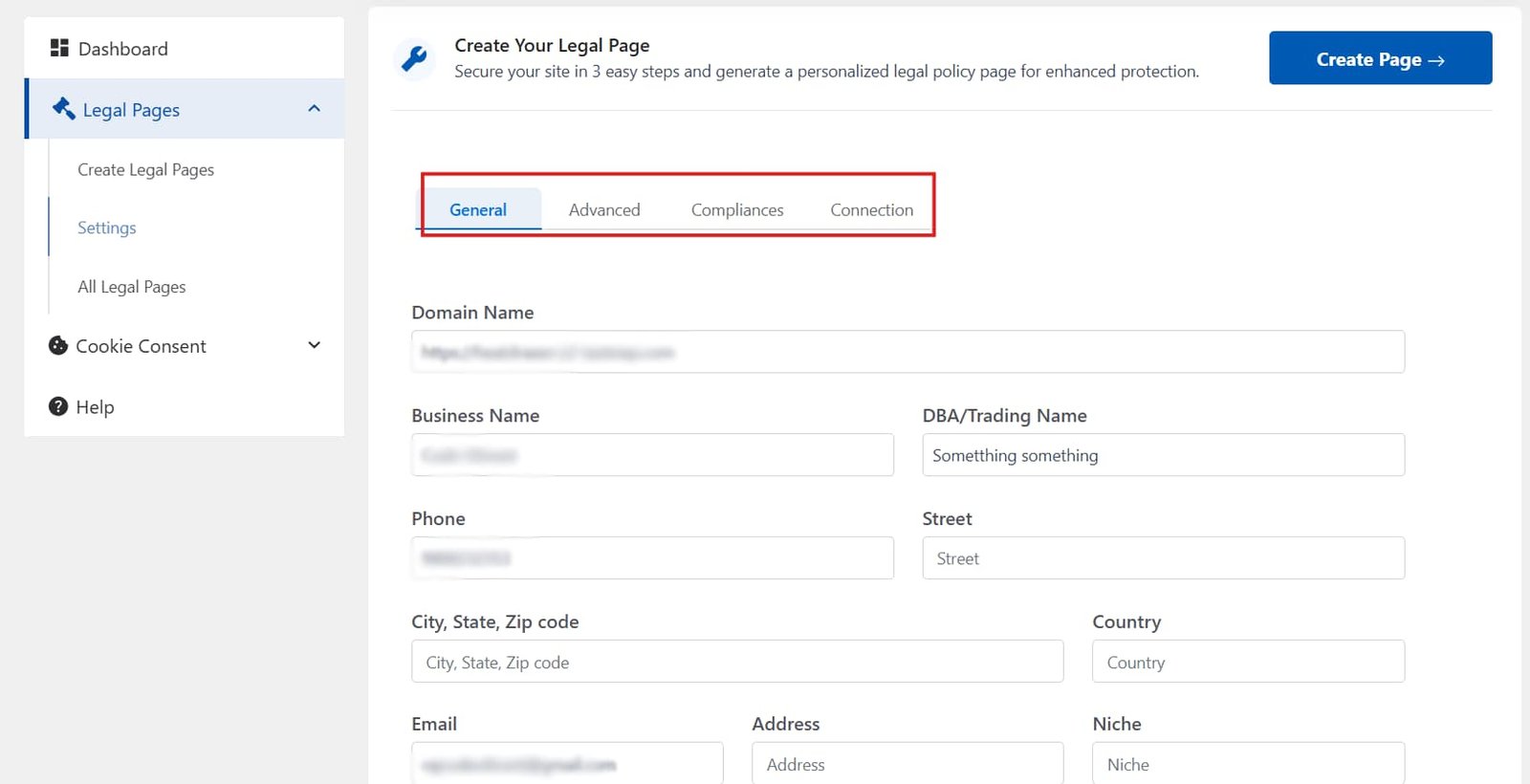
There are four sections that you need to know about in this Settings:
- General: This section is for entering your business data, if you have already created when creating the Legal page using Wizard, the data will be automatically updated.
- Advanced: Advanced Options enables various options like “Show Legal Pages in Search”, “Affiliate Disclosure” (useful if you have an affiliation site.), “Adult Content Site” and others.
- Compliance: Enables you to add Legal Pages in Footer, announcement banner or create age verification popup (useful if you have adult related contents)
- Connection: Shows the connection status of your website and details of your WP Compliance Platform account
Overall, The settings and set up of WP Legal Page seems quite simple. Even if you don’t have any knowledge of legal matters, the plugin makes it quite easy to set up your legal pages.
Setting Up a Cookie Consent Banner with WPLP Compliance Platform
WP Cookie Consent plugins enable you to add a customizable Cookie consent banner.
- You can choose Privacy Law based on your region (for example: GDPR for EU and CCPA for USA)
- Enable or disable Script Blocker until the user consent.
- Allow Consent Logging
- Enable Data Request Form
Creating Cookie Banner
- Go to the Cookie Consent tab from the left-side bar of the WPLP Compliance Platform dashboard.
- Choose Create Cookie Banner
- Select the privacy law or guideline based on your region and choose the region below it for Geo-targetting.
- You’ll be prompted to Configuration tab at section after clicking Save and Continue button
- Enable or Disable toggle options for:
- Enabling Consent Logging
- Allowing or Disallowing Script Blocker
- Respect the Global Privacy Control or Do not Track option
- Enabling Data Request Form
- You can then customize the email for the Data Request as per your preferences.
- Choose how you want to show you Cookie Notice; Banner, Popup or Widget.
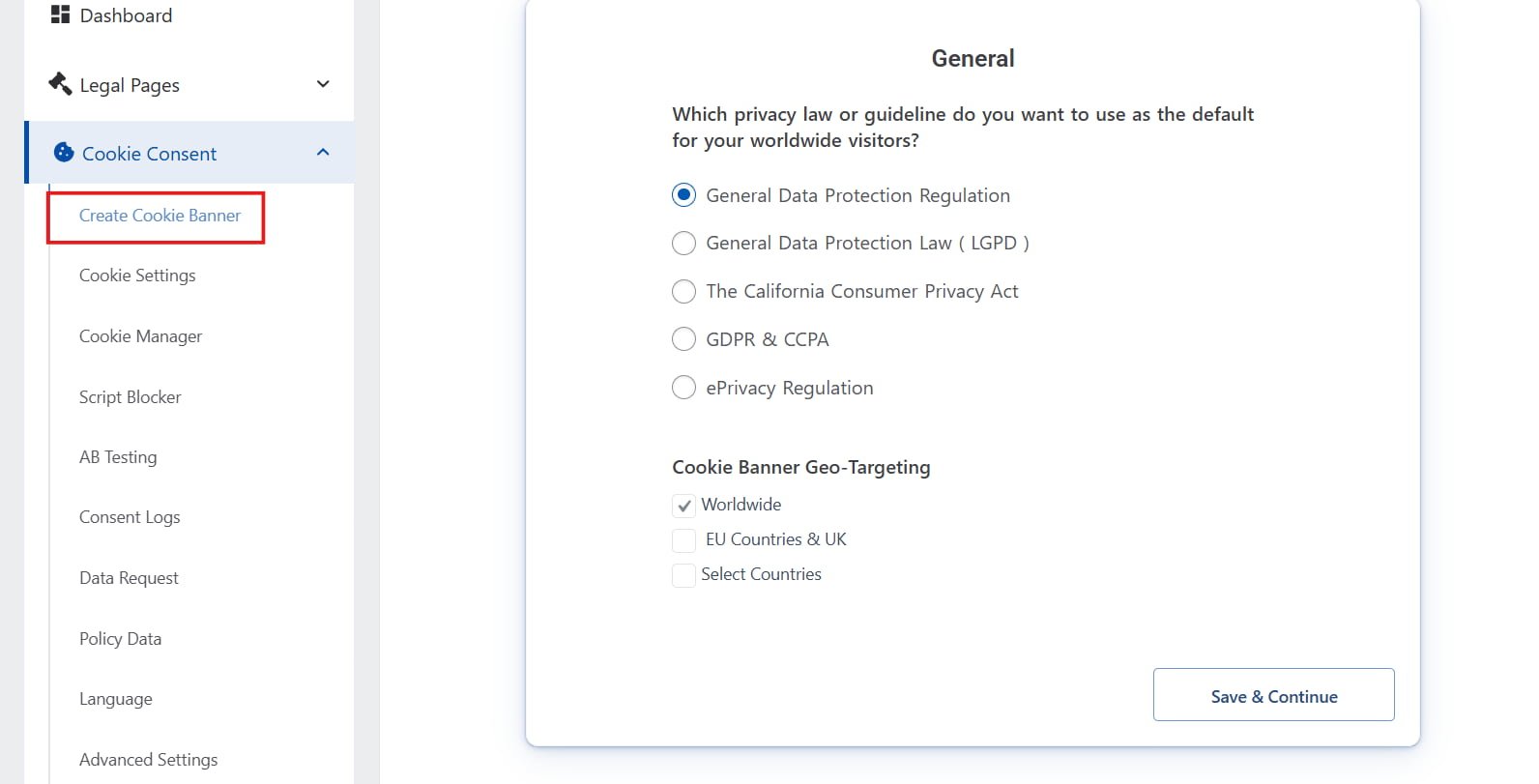
- Go to the Cookie Consent tab from the left-side bar of the WPLP Compliance Platform dashboard.
- Choose Create Cookie Banner
- Select the privacy law or guideline based on your region and choose the region below it for Geo-targetting.
- You’ll be prompted to Configuration tab at section after clicking Save and Continue button
- Enable or Disable toggle options for:
- Enabling Consent Logging
- Allowing or Disallowing Script Blocker
- Respect the Global Privacy Control or Do not Track option
- Enabling Data Request Form
- You can then customize the email for the Data Request as per your preferences.
- Choose how you want to show you Cookie Notice; Banner, Popup or Widget.
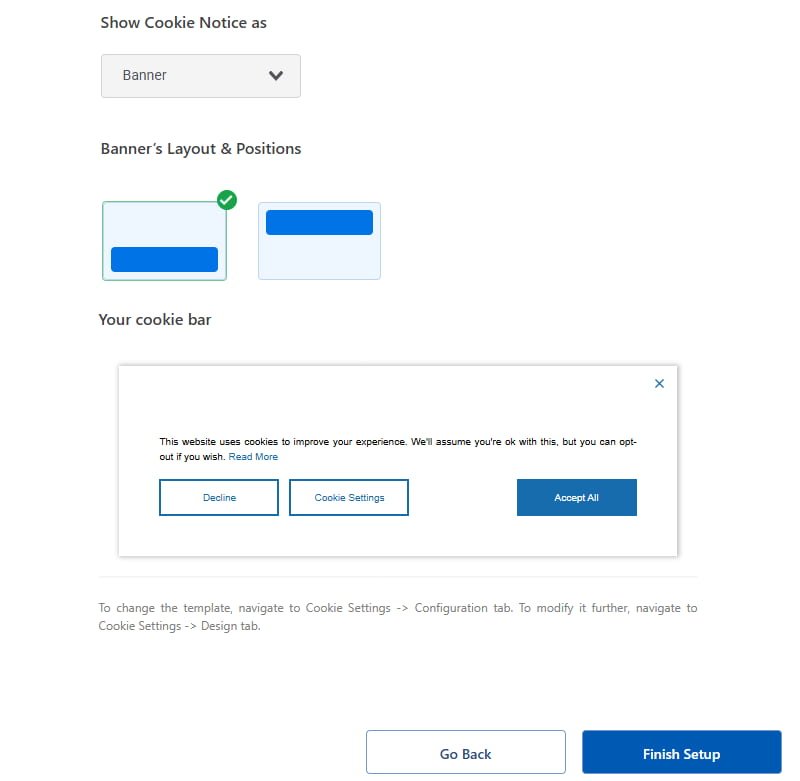
- Select the position for Cookie Banner to appear and then you can click on the Finish Setup option to finalize your changes.
You can look at the banner with the live preview or further customize it just after clicking the button.
If you want to further customize your settings, you can go to Cookie settings from the right sidebar to personalize your cookie.
The most notable option is to enable IAB TCF v.2.2 support (premium feature), which basically is necessary to stay compliant if you’re running ads. You can also enable Google Consent Mode (GCM) which means that you can directly connect your cookie banner with how Google and its products handle tracking, depending on the user choice.
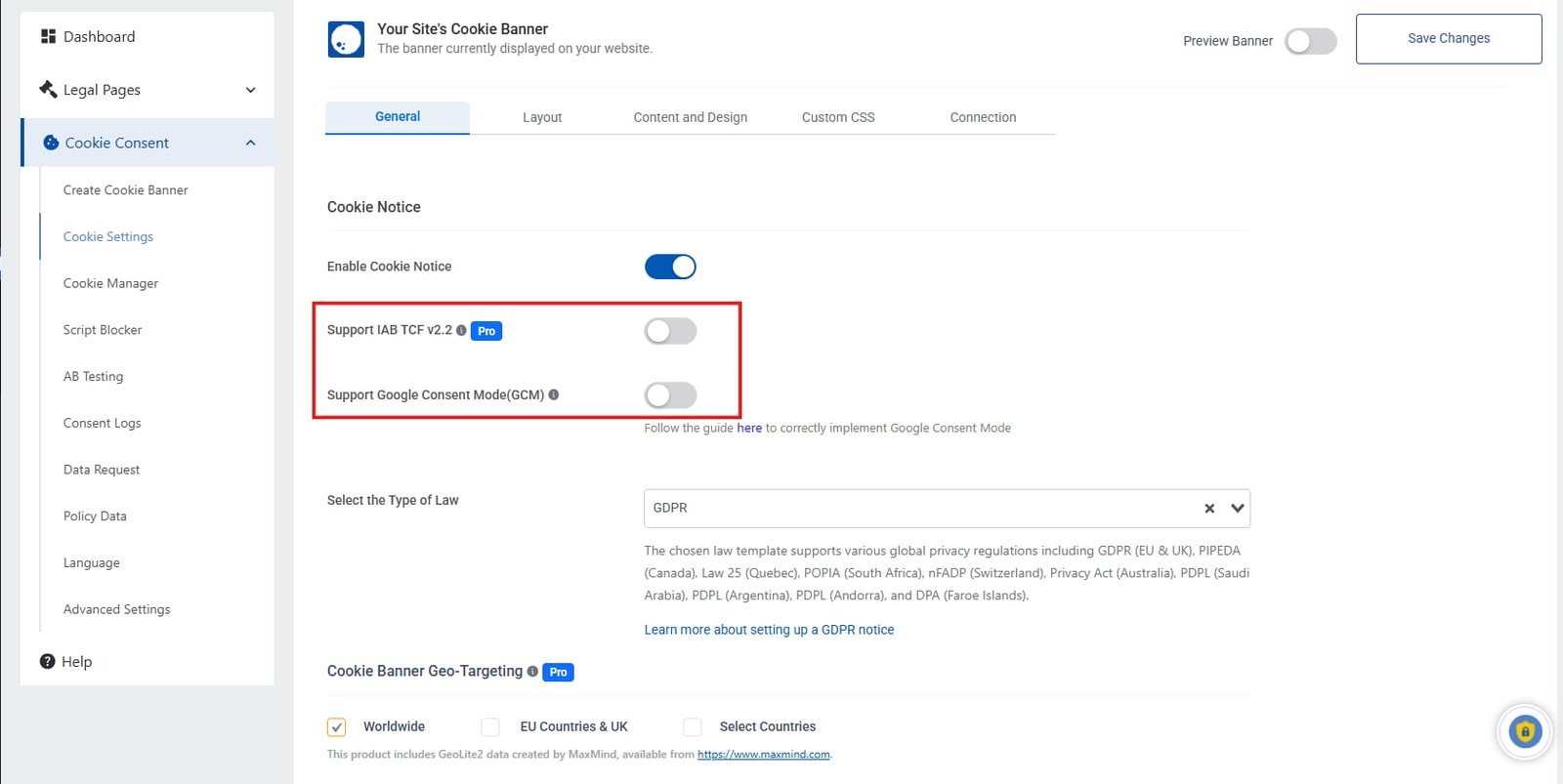
You also have the ability to further customize the banner or choose from 20+ templates, from the Layout tab to further enhance your cookie banner’s style.
There are many in-depth features including Script Blocker, Policy Data and many more.
Go through their documentation, which is well-written by the way, for detailed guidance for efficiently adding your cookie consent banner.
Comparison with other compliance plugins
So, how does this plugin compare to other compliance plugins? I have tried out some well known GDPR compliance plugins, here’s what I found different in this plugin.
- WPLP Compliance Plugin’s core strength is that it offers a single native suite with dashboards making it easier to stay updated and compliant.
- Templates for both legal pages and cookie banners is not the unique feature, but they have large libraries catered for different needs and designs.
- The built-in accessibility tools address two compliance pillars (privacy and accessibility) in a single package.
- The translations might be there for WPLP, but other plugins offer a much better option for multilingual support, if you have to generate automated policies in various languages.
Who is WPLP Compliance Platform for?
With all the reviewing, I can safely say that this plugin is better for:
- Small to Medium businesses: It offers a compliance solution without large legal budget
- Affiliate Marketers and Bloggers: WPLP includes features like Affiliate Disclosure, Privacy, Terms of Use which can be useful for bloggers and affiliate marketers.
- Agencies: Agencies who handle multiple client’s websites will find both WP Legal Page and WP Cookie Consent plugin quite useful (especially with their dedicated plan for the Agencies).
- E-commerce Stores: Useful for Return/Refund policies and data processing disclosures.
How has the WPLP performed: My Final Verdict
I have been using this plugin for quite few days, here’s my opinion on this plugin:
✅The plugin is really all-in-one solution with professionally written and designed templates for legal pages and cookie banner
✅ The script blocking is real. Unlike other plugins which just decorates your website with banners, this Compliance plugin actually blocks the third party scripts until the user consent.
✅ The support and documentation is top-notch. While setting up the plugin, I had some problems with the WP Cookie Consent plugin and my browser. The support patiently aided me to properly set the plugin and review it.
✅ The pricing is really affordable, catered for all type of business.
⚠️ If you are beginner to websites and WordPress, initial setup of this compliance plugin can be tricky to you. Understanding features like IAB TCF and Google Consent Mode can be a bit overwhelming at first.
⚠️ The free version is limited. Not necessarily an issue, but if you are just trying it out, you will be missing a whole lot of features that the plugin actually offers.
⚠️ Although the plugins covers pretty much every aspect for you to stay compliant, it is not a legal replacement for your business. Especially for complex businesses from health or finance industries.
While the plugins might have its own strong points and weaknesses, it is to be noted that WPLP Compliance Platform is your affordable, one-stop privacy suite that genuinely blocks scripts, making complex global compliance a headache of the past. You should definitely consider using it.
2 thoughts on “WPLP Compliance Platform Review: A Comprehensive Privacy Solution for Your WordPress Website”